Ofspace Research
We Reviewed 60 AI Agent Landing Pages. Most Still Do Not Show Who’s in Control.

July 8, 2026
June 28, 2026
We reviewed 60 AI agent landing pages across SaaS, dev tools, and workflow automation - seed to growth stage.
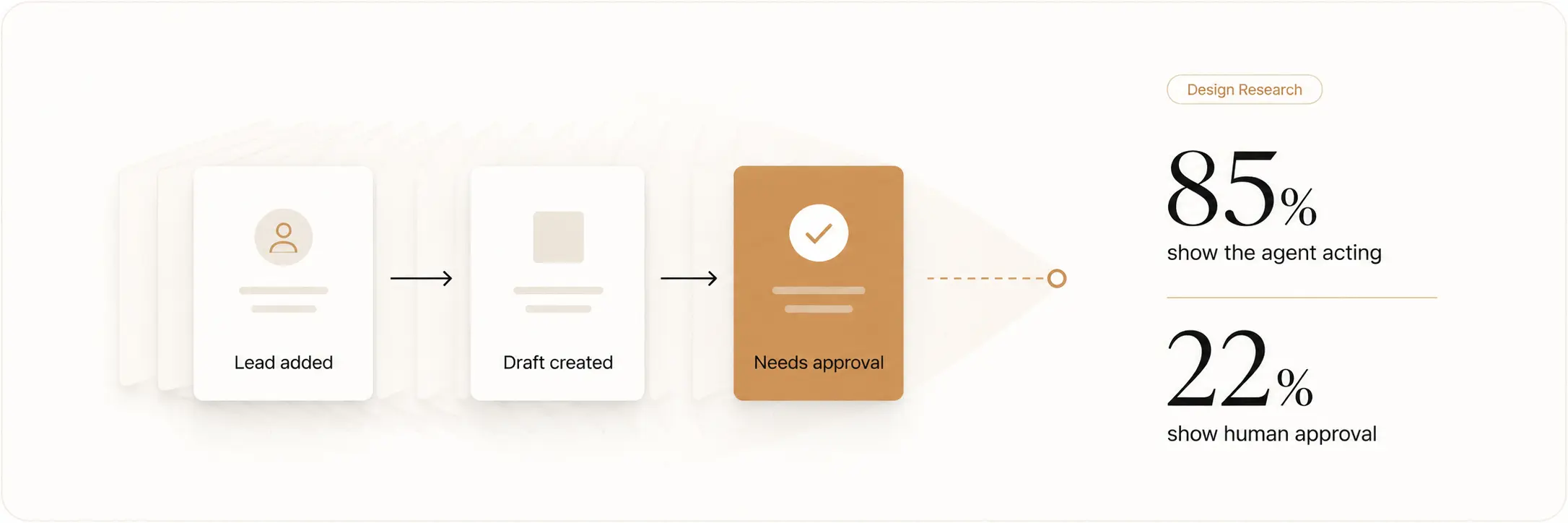
Every page communicates capability well. 85% lead with autonomous capability claims.
72% use abstract AI visuals. The category has agreed on how to look intelligent.
It has not agreed on how to show control.
22% show human oversight. 12% define what the agent cannot do. 7% show system-level trust that goes beyond logos and badges.
The gap between what these pages claim and what they explain is not a copy problem. It is a design problem.
85% Claim High Autonomy. 22% Show Who Is in Control. That Gap Is a Design Problem.
51 of 60 pages lead with the same structural claim.
The language varies -AI employee, autonomous agent, works while you sleep, but the claim is identical: this system acts on your behalf without you having to watch it.
That claim raises one question most pages never answer: what happens when it acts wrong?
13 of 60 pages show any human oversight mechanism. 7 define what the agent cannot do.
Most pages omit control not because it was considered and rejected - but because it was never identified as a design question.
A visitor arriving without context isn't asking to be impressed. They're asking to be reassured.
Those are different design problems. Most pages are solving only the first one.
72% Use Abstract Visuals to Represent Intelligence. Most Make the Product Harder to Understand.
72% of pages used abstract AI visuals in the hero.
63% showed a dashboard or product screen without enough workflow context to explain what was actually happening.
Only 15% showed a concrete workflow with three visible parts:
- A clear input
- A visible agent action
- A clear result
Abstract visuals can make a product feel modern. They can create energy and help a brand feel premium.
But they rarely explain the system.
A node network can show that a product is connected. A glowing interface can suggest speed or intelligence.
A floating dashboard can make a page feel like software.
None of those visuals explain what happens when a trigger fires.
They do not show what the agent reads, what decision it makes, what data it updates, or what reaches the user’s inbox.
That is the information a potential buyer needs.
For AI products, a real workflow is usually more persuasive than an abstract visual.
- Show the trigger.
- Show the action.
- Show the result.
Then show where the user can check or change it.
60% Outsource Trust to Logos. 7% Build It Into the System.
60% of pages relied mainly on logos, badges, awards, or customer numbers.
25% showed no clear trust signal at all.
Only 12% showed where people can check or approve the work. Only 3% showed a visible reliability system.
Logo strips and customer badges can still help. They show that other people or companies have chosen the product.
But autonomous software creates a different kind of concern.
A visitor may be giving the product access to inboxes, CRM records, customer conversations, outreach sequences, or internal documents.
The question is not only, “Is this company credible?”
The harder question is:
“What happens when the product does something I did not intend?”
A logo strip cannot answer that.
An approval flow can.
An audit log can.
A preview before sending can.
A visible pause button can.
A landing page should show how the system behaves before it asks visitors to trust it with meaningful work.
Trust should not come only from reputation.
It should also come from explanation.
57% Cannot Define Who Does What. That Is the Most Expensive Ambiguity on the Page.
57% of pages did not clearly show the split between the user and the product.
32% showed only part of the split.
8% described what the product does without clearly explaining the user’s role.
Only 3% clearly showed who does what from start to finish.
This is one of the most expensive gaps on an AI landing page.
Traditional SaaS usually asks people to use a tool directly.
AI agents work differently.
The user sets up a system, gives it rules, and steps back while it acts.
That handoff is not a small product detail. It is the product experience.
Before someone trusts an AI agent with real work, they need to understand three things:
- What they set up
- What the product handles without asking
- When they regain control
Most pages do not make this visible.
They leave it for documentation, an FAQ, or a demo call.
But the landing page is where a visitor decides whether the product feels understandable enough to explore further.
When visitors cannot picture their own role in the system, they cannot picture themselves using it.
73% Show What the Agent Does. 88% Hide What It Cannot.
73% of pages showed a real task the agent performs.
67% showed what starts that task.
Only 12% explained what the product cannot do, should not do, or needs approval to do.
88% did not show any limitation at all.
The category has learned to show movement.
Draft the email.
Schedule the follow-up.
Update the CRM.
Research the account.
Send the summary.
But movement without limits does not always build confidence.
For many AI products, a wrong action is not always easy to undo.
A bad recommendation may be harmless. A wrong email, incorrect record update, or customer-facing message may not be.
Showing limits is not a weakness signal.
It is a sign that the product team has thought about real use.
A good landing page can say:
- This action needs approval
- The product will not send messages without review
- The agent cannot edit this data source
- You can pause the workflow at any time
- Every action is logged
That is not extra complexity.
That is product clarity.
75% Use the Same Five Design Defaults. The Category Already Has a Template Problem.
45 of the 60 pages used at least three of these patterns together.
The AI agent category is less than three years old at meaningful scale. It already has a visual template.
Gradient background. Autonomous capability claim. Logo strip. Demo CTA. Feature grid.
That sequence appears across sales agents, research agents, and customer support tools. Different products. Same first viewport.
The brand changes. The structure does not.
Only 4 of 60 pages avoid the template entirely. Those 4 are the pages most likely to be remembered after the visitor closes the tab.
Not because they look more expensive. Because they look like a specific product rather than a category member.
The template did not spread because it converts well. It spread because it was already there.
One cohort shipped pages that looked this way. The next cohort treated it as the standard.
A baseline communicates one thing: we belong here.
It does not communicate why a visitor should choose this product over the one that looks identical three tabs over.
What better AI landing pages do differently
Across 60 pages, 4 took a meaningfully different approach. Not more polished.
More honest about what the product does and what it requires from the user.
1. They show what needs approval
Instead of hiding limits in a help centre, they show where the user checks work before it happens.
2. They make the responsibility split visible
They show what the user sets up, what the agent handles, and what comes back for review.
3. They show the trigger before the output
They explain what starts the workflow before showing the final result.
This makes it clear that the user controls when and why the system runs.
4. They show one specific task for one specific user
They do not lead with every possible feature.
They show a clear use case, a clear role, and a clear outcome.
Specificity does not make a product look smaller.
It makes the product easier to understand.
Check Your AI Agent Page in 10 Minutes
You do not need a design agency to find these problems.
You need ten minutes and someone who has never seen your product before.
Ask someone who has never seen your product to review your page.
1. Hide the headline and logos
Can they still explain what the agent does and what starts it?
If not, your hero shows brand mood, not product behaviour.
2. Find the control point
Where can users approve, pause, edit, or correct an action?
If it is not visible, your page does not explain how people stay in control.
3. Ask who does what
Can a visitor clearly explain what the user does versus what the agent does?
If not, the handoff is unclear.
4. Show one limit
What will the agent not do without approval?
Make that answer visible. Limits make autonomous products feel more considered, not less capable.
5. Test the visual
Would a simple workflow explain more than your current hero visual?
Show:
- what starts the task
- what the agent does
- what the user receives or approves
If you find problems in more than two areas, the issue is structural. A new headline alone will not fix it.
What This Data Cannot Tell Us.
This is a structural audit, not a performance study. Three limits to flag.
No causation
Pages with stronger structural clarity may belong to better-run companies overall. The design score may reflect that, not direct conversion impact.
Sample scope
60 pages, mid-2026. The category moves fast.
No user data
Every observation is direct visual analysis. No heatmaps, session recordings, or A/B test data.
What the rubric answers: for a visitor arriving without prior context, does the page help them understand what the agent does, what they control, and what could go wrong? That question is answerable from observation alone.
How We Ran This Study
We reviewed 60 AI agent landing pages across six areas: behaviour, control, responsibility, visuals, use-case clarity, and trust.
For each page, we asked one simple question: can a new visitor understand what the agent does, what the user controls, and what happens when something goes wrong?
Criteria were set before the review. Company names are not published.
What This Means for Your AI Agent Landing Page
Most AI agent landing pages are built to prove capability.
Very few are built to explain control.
Your page does not need more gradients, more feature cards, or a bigger claim about autonomy.
It needs to make four answers clear:
- What does the product actually do?
- What starts it?
- What stays under human control?
- What happens when something goes wrong?
Those answers do not require more copy.
They require better product design decisions.
At Ofspace, we help AI companies design landing pages that explain products as clearly as they showcase them.
If you'd like an objective review of yours, we'd be happy to help.